
Paperchat Dev Blog #1 - Recreating Pictochat's Canvas in React
The canvas element is at the heart of Paperchat's functionality, so our first dev blog episode will cover the entire Canvas.tsx component that replicates Pictochat's iconic canvas on the Nintendo DS back in 2004. Made without any external libraries, it relies solely on the native Canvas events and API to work, so let's get into it.
Check out the most up to date version of the code at https://github.com/Lietsaki/paperchat/blob/main/components/Canvas.tsx.
What we'll learn today
- Creating a canvas component with Next.js / React.
- Exploring and applying many methods of the Canvas API to draw, erase, write and copy images.
Canvas.tsx - What makes this component so special
- Is fully offline, which means you can easily reuse it in your own projects.
- Allows drawing and erasing lines with different thickness values.
- Inserts text by listening to events from the Keyboard component (which we'll visit in a future article), including key drag and drop.
- Crops images before sending them as messages. The 4 possible ways of cropping are the same as in the original Pictochat.
- Copies the last message in the room into the current Canvas.
1. Component setup
We'll start by importing all hooks and helper functions needed in the component. Then, define the types that will be used in this component only (so no need to export them) and the constants that can stay out of the React component because they won't change and we don't need them recreated on every render.
Now inside the component, define all ref and state variables, and the consts that we need re-evaluated on every render. Carefully reading all variables defined here will give you a clear idea of the logic we'll implement in the component's methods.
import styles from 'styles/components/canvas.module.scss'
import React, { useEffect, useState, useRef } from 'react'
import useTranslation from 'i18n/useTranslation'
import emitter from 'helpers/MittEmitter'
import { ClientPos, PositionObj, HistoryStroke } from 'types/Position'
import {
  getPercentage,
  dropPosOffset,
  getHighestAndLowestPoints,
  getLighterHslaShade,
  loadImage,
  playSound,
  keepOnlyShadesOfGray,
  containsNonLatinChars
} from 'helpers/helperFunctions'

const { canvas_outline, canvas_content, usernameRectangle } = styles

type CanvasProps = {
  usingThickStroke: boolean
  usingPencil: boolean
  roomColor: string
  username: string
  clearCanvas: (clearEvenEmpty?: boolean, skipSound?: boolean) => void
}

interface TextData {
  isSpace?: boolean
  isEnter?: boolean
  isKey?: boolean
  x: number
  y: number
  keyWidth?: number
  keyHeight?: number
}

// COLOR DATA
const canvasBgColor = '#FDFDFD'
const canvasBgColorArr = [253, 253, 253]
const strokeColor = '#111'
const strokeRGBArray = [17, 17, 17]

const SOUND_TRIGGERING_DISTANCE = 25
const AVERAGE_LETTER_HEIGHT = 15
const PRUDENTIAL_STROKE_WAIT = 300

// 1000ms / 8 = 125ms, so we'd be getting 125 draw calls per second.
const DRAWING_COOLDOWN = 8

const Canvas = ({
  usingThickStroke,
  usingPencil,
  roomColor,
  username,
  clearCanvas
}: CanvasProps) => {
  const { t } = useTranslation()

  // REFS
  const containerRef = useRef<HTMLDivElement>(null)
  const canvasRef = useRef<HTMLCanvasElement | null>(null)
  const firstLineYRef = useRef(0)
  const usernameRectPixelBorderSize = useRef(0)
  const lastDrawingTime = useRef(0)

  // DRAWING STATE
  const [pos, setPos] = useState<PositionObj>({ x: 0, y: 0 })
  const [keyPos, setKeyPos] = useState<PositionObj>({ x: 0, y: 0 })
  const [draggingKey, setDraggingKey] = useState('')
  const [textHistory, setTextHistory] = useState<TextData[]>([])
  const [ctx, setCanvasCtx] = useState<CanvasRenderingContext2D | null>(null)
  const [nameContainerWidth, setNameContainerWidth] = useState(0)
  const [divisionsHeight, setDivisionsHeight] = useState(0)
  const [consecutiveStrokes, setConsecutiveStrokes] = useState<HistoryStroke[]>([])
  const [latestFiredStrokeSound, setLatestFiredStrokeSound] = useState(0)

  const smallDevice = typeof window !== 'undefined' ? window.screen.width < 800 : false
2. The first "support methods": divisions, lines and position
The first methods defined in the component are related to how the canvas is divided in 5 equal parts, and we need ways to get the next and previous Y division when inserting text.
Since we're working with canvas pixels and not CSS pixels, you should multiply the operations by window.devicePixelRatio so the distances and transforms scale across devices with
higher DPR values (e.g. Retina Display screens and mobile phones).
const getNewLineStartX = () => {
  const dpr = Number((window.devicePixelRatio || 1).toFixed(2))
  return 8 * Math.min(2.5, dpr)
}

const getNextYDivision = (y: number) => {
  const safetyOffset = 1
  const nextDivision = y + divisionsHeight + safetyOffset

  if (nextDivision > canvasRef.current!.height) return firstLineYRef.current

  return nextDivision
}

const getPreviousYDivision = (y: number) => {
  const previousDivision = y - divisionsHeight
  if (0 > previousDivision) return 0
  return previousDivision
}

const getStartOfDivision = (y: number) => {
  let division = 0

  while (division + divisionsHeight < y) {
    division += divisionsHeight
  }

  return division
}

const getLineWidth = () => {
  const pxSize = window.devicePixelRatio || 1

  if (usingThickStroke) {
    if (pxSize >= 3) return pxSize * 2.5
    if (pxSize >= 2) return pxSize * 3
    return pxSize * 4
  } else {
    if (pxSize >= 3) return pxSize * 1
    if (pxSize >= 2) return pxSize * 1.2
    return pxSize * 1.5
  }
}

const getPosition = (e: ClientPos) => {
  const canvas = canvasRef.current!
  const rect = canvas.getBoundingClientRect() // abs. size of element
  const scaleX = canvas.width / rect.width // relationship bitmap vs. element for x
  const scaleY = canvas.height / rect.height // relationship bitmap vs. element for y

  // Scale mouse coordinates after they have been adjusted to be relative to the element
  return {
    x: Math.floor((e.clientX - rect.left) * scaleX),
    y: Math.floor((e.clientY - rect.top) * scaleY)
  }
}

const resetPosition = () => setPos({ x: 0, y: 0 })

const getFontSize = (text?: string) => {
  if (text && containsNonLatinChars(text)) {
    return getPercentage(76, divisionsHeight)
  }

  return getPercentage(88, divisionsHeight)
}

const posOverflowsX = (pos: PositionObj) => pos.x >= getPercentage(98, canvasRef.current!.width)

const divisionsHeightWithMargin = () => divisionsHeight + 6

// In drawUsernameRectangle we multiply by 2, do so by 3 here to account for the border's width itself
const nameContainerWidthWithExtraPixels = () => {
  const small_margin = 0.4 * (window.devicePixelRatio || 1)
  return nameContainerWidth + usernameRectPixelBorderSize.current * 3 + small_margin
}

const isWithinUsername = (pos: PositionObj) => {
  return pos.x < nameContainerWidthWithExtraPixels() && pos.y < divisionsHeightWithMargin()
}

// starting X refers to the end of the username rectangle, where the first line of user-generated text can begin
const getStartingX = () => {
  const margin = 6 * (window.devicePixelRatio || 1)
  return nameContainerWidthWithExtraPixels() + margin
}
The most important method in this section is definitely getPosition, which converts screen coordinates into canvas ones. We'll use this method when dropping keys from the Keyboard component and when drawing.
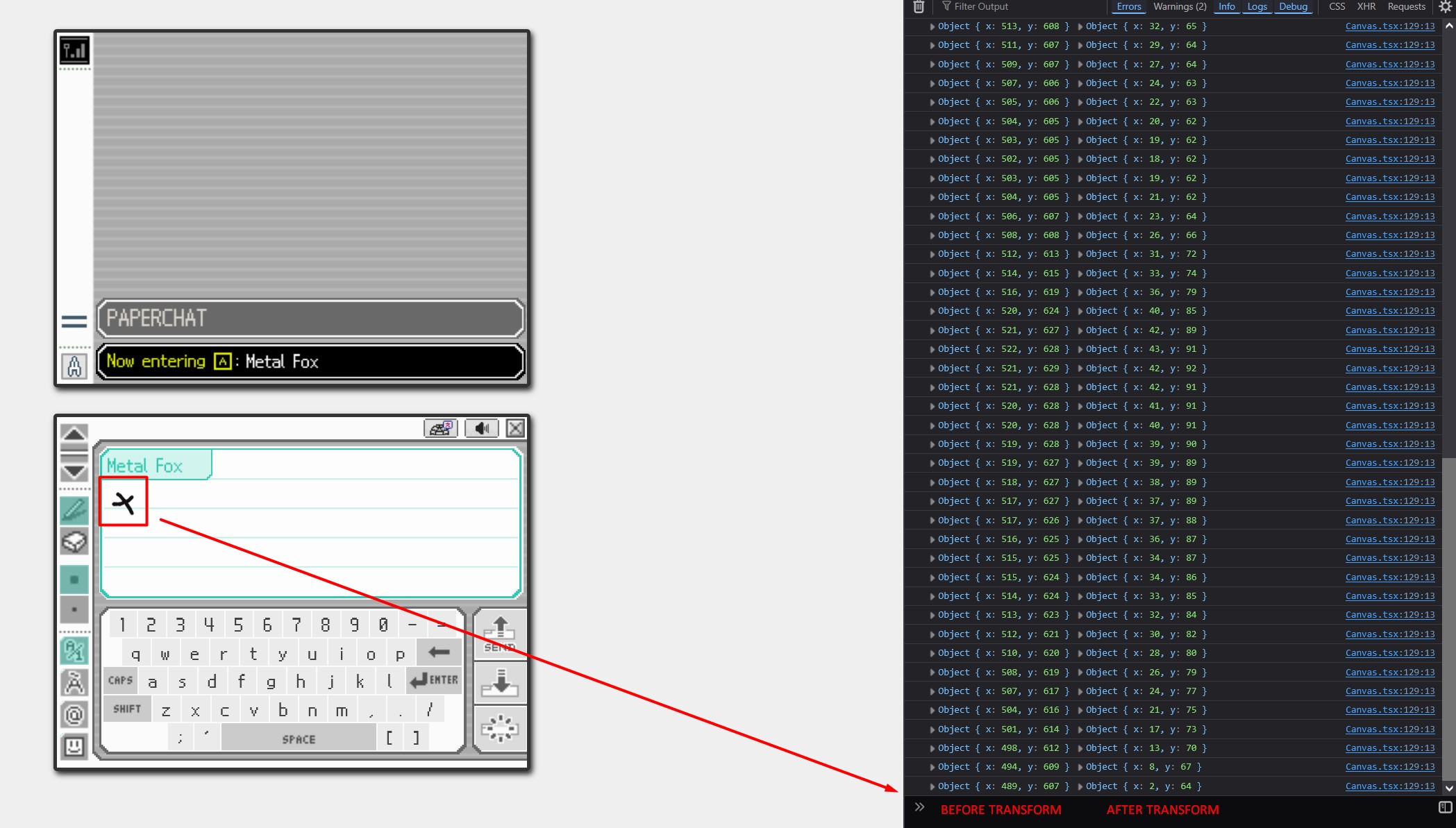
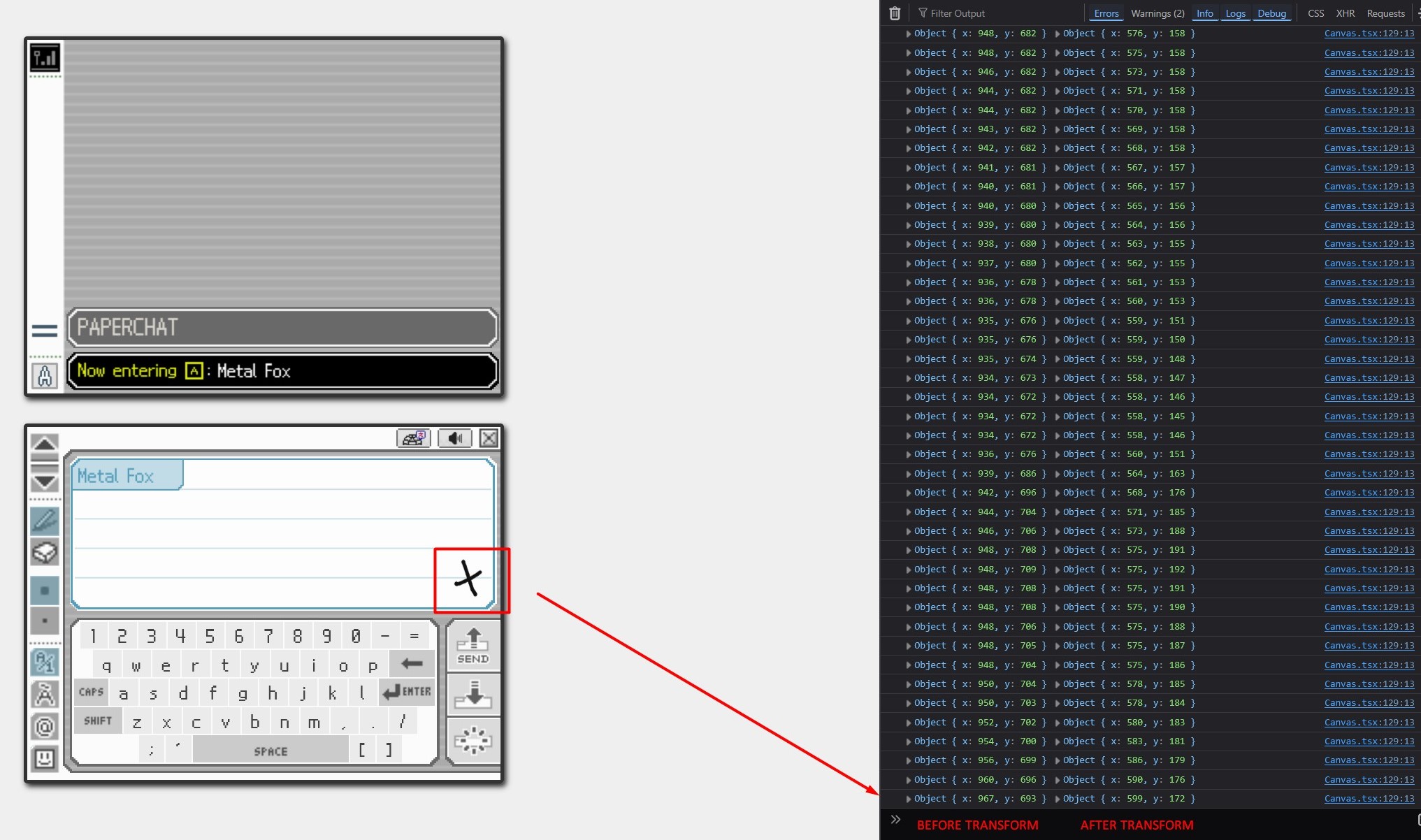
The math behind it might seem a bit tricky to understand at first, but in a nutshell you can think of this function as a translator where you pass a screen coordinate of type ClientPos and receive the equivalent inside the canvas:
type ClientPos = {
  clientX: number
  clientY: number
}
Say you click somewhere near the top of the canvas, and you receive the exact position of the canvas where your click occurred. This is because Canvas elements can be displayed at a different size than their bitmap resolution (the actual number of pixels in the image data), you can see this if you inspect the element with your dev tools:
// Bitmap resolution: 800x600 pixels
// Display size: 400x300 pixels
<canvas width="800" height="600" style="width: 400px; height: 300px">
This is influenced by the device pixel ratio, you'll see that the canvas oftentimes has larger resolution values in mobile devices where window.devicePixelRatio is a larger number, even though their screen is physically smaller.
Don't let this bother you though, consider it a helper function that should be part of the Canvas API if you find yourself spending too much time trying to wrap your head around it.
Here's a log of the values before and after being transformed so you can see a clear example:
3. Inserting and deleting text methods
The text-related functions follow a pretty simple pattern: get last key position used -> insert key -> save last position and update text history.
const handleTextInsert = (key: string, posToUse?: PositionObj) => {
  if (!ctx) return

  const keyPosition = posToUse || keyPos
  ctx.globalCompositeOperation = 'source-over'
  ctx.fillStyle = strokeColor
  ctx.font = `${getFontSize()}px 'nds', roboto, sans-serif`

  const textMetrics = ctx.measureText(key)
  const nextKeyPos = { x: Math.round(keyPosition.x + textMetrics.width), y: keyPosition.y }
  const marginRight = 3 * (window.devicePixelRatio || 1)
  const nextKeyWillOverflowCanvas = posOverflowsX({
    x: nextKeyPos.x + marginRight,
    y: nextKeyPos.y
  })

  if (nextKeyWillOverflowCanvas) {
    nextKeyPos.x = getNewLineStartX()
    nextKeyPos.y = getNextYDivision(keyPosition.y)

    const wouldKeysBeWithinUsername = isWithinUsername({
      x: getNewLineStartX(),
      y: nextKeyPos.y - AVERAGE_LETTER_HEIGHT
    })
    if (wouldKeysBeWithinUsername) nextKeyPos.x = getStartingX()
  }

  setTextHistory([
    ...textHistory,
    {
      isKey: true,
      x: keyPosition.x,
      y: keyPosition.y,
      keyWidth: textMetrics.width,
      keyHeight: textMetrics.fontBoundingBoxAscent + textMetrics.fontBoundingBoxDescent
    }
  ])

  ctx.fillText(key, keyPosition.x, keyPosition.y)
  setKeyPos(nextKeyPos)
}

const typeKey = (key: string) => {
  if (!ctx || keyPos.y === -1) return
  handleTextInsert(key)
}

const typeSpace = () => {
  if (keyPos.y === -1) return
  const spaceVal = 4 * Math.max(1.25, window.devicePixelRatio || 1)
  const nextKeyPos = { x: keyPos.x + spaceVal, y: keyPos.y }
  const nextKeyWillOverflowCanvas = posOverflowsX(nextKeyPos)

  if (nextKeyWillOverflowCanvas) {
    nextKeyPos.x = getNewLineStartX()
    nextKeyPos.y = getNextYDivision(keyPos.y)

    const wouldKeysBeWithinUsername = isWithinUsername({
      x: getNewLineStartX(),
      y: nextKeyPos.y - AVERAGE_LETTER_HEIGHT
    })
    if (wouldKeysBeWithinUsername) nextKeyPos.x = getStartingX()
  }

  setKeyPos(nextKeyPos)
  setTextHistory([...textHistory, { isSpace: true, x: nextKeyPos.x, y: nextKeyPos.y }])
}

const typeEnter = () => {
  const nextKeyPos = { x: getNewLineStartX(), y: getNextYDivision(keyPos.y) }
  const wouldKeysBeWithinUsername = isWithinUsername({
    x: getNewLineStartX(),
    y: nextKeyPos.y - AVERAGE_LETTER_HEIGHT
  })

  if (wouldKeysBeWithinUsername) nextKeyPos.x = getStartingX()

  setKeyPos(nextKeyPos)
  setTextHistory([...textHistory, { isEnter: true, x: nextKeyPos.x, y: nextKeyPos.y }])
}

const typeDel = () => {
  if (!ctx || !textHistory.length) return
  const lastKey = textHistory[textHistory.length - 1]

  if (lastKey.isKey) {
    ctx.clearRect(
      lastKey.x - 1,
      lastKey.y - (lastKey.keyHeight! - (smallDevice ? 4 : 3)),
      lastKey.keyWidth! + 1,
      lastKey.keyHeight! + 1
    )
    setKeyPos({ x: lastKey.x, y: lastKey.y })
  } else if (lastKey.isSpace) {
    setKeyPos({ x: lastKey.x - 5, y: lastKey.y })
  } else if (lastKey.isEnter) {
    let previousX = getStartingX()
    let previousY = getPreviousYDivision(lastKey.y)
    const keyBehindPrevious = textHistory[textHistory.length - 2]

    if (keyBehindPrevious) {
      const { x, y, keyWidth } = keyBehindPrevious
      previousX = keyWidth ? x + keyWidth : x
      previousY = y
    }

    setKeyPos({ x: previousX, y: previousY })
  }

  setTextHistory(textHistory.slice(0, -1))
}

const dropDraggingKey = (posToDropIn: ClientPos, draggingKey: string) => {
  if (!draggingKey || !ctx) return

  const { height, width } = canvasRef.current!
  const offsetPos = dropPosOffset(getPosition(posToDropIn))
  const { x, y } = offsetPos
  const droppedOutsideCanvas = y >= height || 8 >= y || x >= width || 8 >= x

  if (isWithinUsername(offsetPos) || droppedOutsideCanvas) return
  handleTextInsert(draggingKey, offsetPos)
  playSound('drop-key', 0.2)
}

const drawDivisions = () => {
  const divisionsCanvas = document.createElement('canvas')
  const divCtx = divisionsCanvas.getContext('2d')!
  divisionsCanvas.width = containerRef.current!.offsetWidth * (window.devicePixelRatio || 1)
  divisionsCanvas.height = containerRef.current!.offsetHeight * (window.devicePixelRatio || 1)

  divCtx.fillStyle = canvasBgColor
  divCtx.fillRect(0, 0, canvasRef.current!.width, canvasRef.current!.height)
  divCtx.strokeStyle = roomColor.replace('1.0', '0.6')
  divCtx.lineWidth = 1

  for (let i = 1; i < 5; i++) {
    divCtx.beginPath()
    divCtx.moveTo(3, divisionsHeight * i)
    divCtx.lineTo(canvasRef.current!.width - 3, divisionsHeight * i)
    divCtx.stroke()
  }

  const dataUrl = divisionsCanvas.toDataURL('image/png')
  const existingDivisions = document.getElementById('canvasDivisions')
  if (existingDivisions) existingDivisions.remove()
  const img = new Image()
  img.id = 'canvasDivisions'
  img.src = dataUrl
  img.draggable = false
  containerRef.current!.append(img)
}
Let's see a quick overview:
-
handleTextInsert: Checks if the text will overflow the canvas by measuring the width it'd have before inserting it (yes, that is possible!), and inserts it in the desired position or in the next line if it would indeed overflow. Finally, it updates the text history, we need to keep it so we can delete keys in arbitrary positions, imagine someone just drops a bunch of keys randomly on the canvas and then presses the delete key many times.
-
typeKey: Method to attach to event listenters, this one just calls
handleTextInsertafter checkingctxexists. -
typeSpace: Instead of inserting any text, simply moves the key position variable by a fixed amount.
-
typeEnter: Moves the key position to the next line, making sure not to collide with the username rectangle.
-
typeDel: Uses the text history to delete the last key, or goes back to the previous key position if the last item to delete is a space or an enter press.
-
dropDraggingKey: This method is attached to an event listener (mouseup) to handle the drag and drop of keys from the Keyboard component. We'll return here when we cover the virtual keyboard implementation.
-
drawDivisions: Creates an independent canvas to draw 5 horizontal lines on it, and then append it as an image to the div that contains the main canvas. Runs on mounted.
4. Drawing Methods
Next up, we have the method that creates the username rectangle, notice the repeated calls to lineTo in drawUsernameRectangle to create the pixelated corner effect.
const trimTextToWidth = (ctx: CanvasRenderingContext2D, text: string, maxWidth: number) => {
  if (ctx.measureText(text).width <= maxWidth) {
    return text
  }

  const ellipsis = ' …'
  const ellipsisWidth = ctx.measureText(ellipsis).width

  let trimmed = text

  while (trimmed.length > 0) {
    trimmed = trimmed.slice(0, -1)
    if (ctx.measureText(trimmed).width + ellipsisWidth <= maxWidth) {
      return trimmed + ellipsis
    }
  }

  return ellipsis
}

const drawUsernameRectangle = (
  ctx: CanvasRenderingContext2D,
  loadFont?: boolean,
  appendImgToCanvas?: boolean
) => {
  if (!ctx || !canvasRef.current) return
  let ctxToUse: CanvasRenderingContext2D
  let usernameCanvas: HTMLCanvasElement
  const dpr = window.devicePixelRatio || 1

  if (appendImgToCanvas) {
    usernameCanvas = document.createElement('canvas')
    ctxToUse = usernameCanvas.getContext('2d')!
    usernameCanvas.width = nameContainerWidthWithExtraPixels()
    usernameCanvas.height = divisionsHeightWithMargin()
  } else {
    // Clear the username rectangle area before drawing.
    // Don't use clearRect, we need the bg color.
    ctxToUse = ctx
    ctxToUse.fillStyle = canvasBgColor
    ctxToUse.fillRect(0, 0, nameContainerWidth + 5, divisionsHeight + 5)
  }

  const lineWidth = dpr >= 2 ? dpr * 1 : dpr * 1.5

  const pixelBorderSize = usernameRectPixelBorderSize.current
  ctxToUse.globalCompositeOperation = 'source-over'
  ctxToUse.lineJoin = 'bevel'
  ctxToUse.imageSmoothingEnabled = false
  ctxToUse.lineWidth = lineWidth
  ctxToUse.fillStyle = getLighterHslaShade(roomColor)
  ctxToUse.strokeStyle = roomColor
  ctxToUse.beginPath()
  ctxToUse.moveTo(0, divisionsHeight)
  ctxToUse.lineTo(nameContainerWidth, divisionsHeight)
  ctxToUse.lineTo(nameContainerWidth, divisionsHeight - pixelBorderSize)
  ctxToUse.lineTo(nameContainerWidth + pixelBorderSize, divisionsHeight - pixelBorderSize)
  ctxToUse.lineTo(nameContainerWidth + pixelBorderSize, divisionsHeight - pixelBorderSize * 2)
  ctxToUse.lineTo(nameContainerWidth + pixelBorderSize * 2, divisionsHeight - pixelBorderSize * 2)
  // Send the line above the canvas (-5 y) to hide the top stroke, which we don't want to show.
  ctxToUse.lineTo(nameContainerWidth + pixelBorderSize * 2, -5)
  ctxToUse.lineTo(0, -5)
  ctxToUse.fill()
  ctxToUse.stroke()
  ctxToUse.fillStyle = roomColor

  // Write username making sure our font loaded first
  const f = new FontFace('nds', 'url(/fonts/nds.ttf)')

  const writeUsername = () => {
    if (!ctx || !canvasRef.current) return
    ctxToUse.font = `${getFontSize(username)}px 'nds', roboto, sans-serif`
    ctx.font = `${getFontSize(username)}px 'nds', roboto, sans-serif`

    const firstLineY = getPercentage(80, divisionsHeight)
    let usernameX = Math.max(8, 6 * (window.devicePixelRatio || 1))

    const trimmedUsername = trimTextToWidth(ctxToUse, username, nameContainerWidth - usernameX)
    ctxToUse.fillText(trimmedUsername, usernameX, firstLineY - 1.5)
    setKeyPos({ x: getStartingX(), y: firstLineY })

    firstLineYRef.current = firstLineY

    if (appendImgToCanvas) {
      const dataUrl = usernameCanvas.toDataURL('image/png')
      const existingUserRect = document.getElementById(usernameRectangle)
      if (existingUserRect) existingUserRect.remove()
      const img = new Image()
      img.id = usernameRectangle
      img.src = dataUrl
      img.draggable = false
      containerRef.current!.append(img)
    }
  }

  if (loadFont) f.load().then((font) => writeUsername())
  else writeUsername()
}

const draw = (e: React.PointerEvent) => {
  e.preventDefault()
  if (draggingKey) return
  const pointerIsMakingContact = e.buttons === 1

  const now = performance.now()
  if (now - lastDrawingTime.current < DRAWING_COOLDOWN) return

  if (!ctx || !pointerIsMakingContact || isWithinUsername(pos)) return setPos(getPosition(e))
  lastDrawingTime.current = now

  ctx.beginPath()
  ctx.globalCompositeOperation = usingPencil ? 'source-over' : 'destination-out'
  ctx.lineCap = 'round'
  ctx.lineWidth = getLineWidth()
  ctx.strokeStyle = strokeColor

  ctx.moveTo(pos.x, pos.y)
  const newPos = getPosition(e)
  setPos(newPos)
  ctx.lineTo(newPos.x, newPos.y)
  ctx.stroke()

  const updatedStrokes = [...consecutiveStrokes, { ...newPos, ts: Date.now() }]
  setConsecutiveStrokes(updatedStrokes)
  checkLatestStrokes(updatedStrokes)
}

const checkLatestStrokes = (strokes: HistoryStroke[]) => {
  const lastHalfSecond = Date.now() - 500
  const timespanStrokes = strokes.filter((stroke) => stroke.ts > lastHalfSecond)

  const firstStroke = timespanStrokes[0]
  const lastStroke = timespanStrokes[timespanStrokes.length - 1]

  if (latestFiredStrokeSound && lastStroke.ts < latestFiredStrokeSound + PRUDENTIAL_STROKE_WAIT) {
    return
  }

  const xDiff = Math.abs(lastStroke.x - firstStroke.x)
  const yDiff = Math.abs(lastStroke.y - firstStroke.y)

  const distanceToUse = xDiff > yDiff ? xDiff : yDiff

  // Prevent sounds from accidentally firing twice (or thrice) in a row
  if (distanceToUse >= SOUND_TRIGGERING_DISTANCE) {
    setLatestFiredStrokeSound(lastStroke.ts)
    let volume = usingThickStroke ? 0.3 : 0.15

    if (smallDevice) volume = 0.6
    if (usingPencil) return playSound('pencil-stroke', volume)
    return playSound('eraser-stroke', volume)
  }
}

const endDrawing = (e: React.PointerEvent) => {
  e.preventDefault()
  setConsecutiveStrokes([])
}

const drawDot = (e: React.PointerEvent) => {
  e.preventDefault()
  if (draggingKey) return
  const posToUse = e.pointerType !== 'mouse' ? getPosition(e) : pos
  const usedMouseNoLeftBtn = e.pointerType === 'mouse' && e.buttons !== 1

  if (!ctx || usedMouseNoLeftBtn || isWithinUsername(posToUse)) return setPos(getPosition(e))
  if (e.pointerType !== 'mouse') setPos(posToUse)

  ctx.beginPath()
  ctx.globalCompositeOperation = usingPencil ? 'source-over' : 'destination-out'
  ctx.lineCap = 'round'
  ctx.lineWidth = getLineWidth()
  ctx.strokeStyle = strokeColor

  ctx.moveTo(posToUse.x, posToUse.y)
  ctx.lineTo(posToUse.x, posToUse.y)
  ctx.stroke()

  if (usingPencil) {
    playSound('draw-dot', 0.04)
  } else {
    playSound('erase-dot', 0.04)
  }
}
The drawing functions remain pretty simple with extra logic to keep track of the amount of strokes while the pointer is down (we consider the drawing of a stroke has ended with the onPointerUp event), which we use to play the sound of a pencil or eraser on our canvas.
It's also important to keep a drawing cooldown time to prevent too many unnecessary draw calls to the canvas which can overwhelm certain devices or straight up cause the app to crash when compiled for Android with Capacitor due to a more limited GPU memory in the WebView.
About inserting the username rectangle as an image
You may have noticed that the username rectangle in the canvas area is actually an image on top of it. That's because even if we prevent drawing and dropping keys in that area, some strokes can still leak into it if you draw really fast.
Having an image alongside with the drawing restriction in that area is very practical and safe, but as you can see, we don't set its width and height from the method, but from our SCSS file:
// canvas.module.scss
...
    img#usernameRectangle {
      position: absolute;
      left: 0px;
      top: 0px;
      width: auto;
      height: 23%;
      z-index: 1000;

      @media (resolution = 1dppx) and (max-width: 1400px) {
        height: 24%;
      }

      @media (resolution >= 2dppx) {
        height: 22%;
      }

      @media (resolution >= 3dppx) {
        height: 21.3%;
      }
    }
...
See the entire styles for the canvas here.
Resolution (device pixel ratio) media queries allow the username rectangle to grow or shrink a little bit in screens that would draw the canvas with more or less pixel resolution. You could also set the width and height when creating the image:
const drawUsernameRectangle = (
  ctx: CanvasRenderingContext2D,
  loadFont?: boolean,
  appendImgToCanvas?: boolean
) => {
  ...

  if (appendImgToCanvas) {
    const dataUrl = usernameCanvas.toDataURL('image/png')
    const existingUserRect = document.getElementById(usernameRectangle)
    if (existingUserRect) existingUserRect.remove()
    const img = new Image()
    img.id = usernameRectangle
    img.src = dataUrl
    img.draggable = false

    img.style.width = `${usernameCanvas.width / dpr}px`
    img.style.height = `${usernameCanvas.height / dpr}px`

    containerRef.current!.append(img)
  }

...

}
Here we'd be translating the width and height of the usernameCanvas from the canvas pixels into CSS pixels by dividing them by the device pixel ratio, but you'd have to recalculate this every time the window is resized, and that would imply clearing the canvas (every time the width or height of a canvas is set, its content is cleared).
Plus, fixed styles set from JS aren't that clean, are they? I find the resolution media query to be a solid alternative in this case.
5. Implementing the custom message crop logic from Pictochat
We've finally reached the send message method, one of, if not the most interesting method in the entire component.
But before that, let's have a quick stop by copyCanvas, where we'll create a temporary canvas to draw the received image URI (the latest image in the room as per the feature), remove the white background and keep only shades of gray thanks to a helper function, and finally write that onto our main canvas.
const copyCanvas = async (imgUri: string) => {
  if (!ctx || !canvasRef.current) return
  const dpr = window.devicePixelRatio || 1

  // Use a different content (imgCtx) to draw the received image and remove its white background
  // If we removed it in ctx, it'd cause lag on mobile.
  const imgCanvas = document.createElement('canvas')
  imgCanvas.width = ctx.canvas.width * dpr
  imgCanvas.height = ctx.canvas.height * dpr
  const imgCtx = imgCanvas.getContext('2d')!

  const receivedImg = await loadImage(imgUri)
  const ratio = receivedImg.naturalWidth / receivedImg.naturalHeight

  // Draw the received image which will have a white background
  imgCtx.drawImage(
    receivedImg,
    0,
    0,
    receivedImg.width * dpr,
    receivedImg.height * dpr,
    0,
    0,
    ctx.canvas.width * dpr,
    (ctx.canvas.width / ratio) * dpr
  )

  keepOnlyShadesOfGray(imgCtx, canvasBgColorArr)
  const transparentDataURL = imgCanvas.toDataURL()
  const transparentImg = await loadImage(transparentDataURL)

  // Draw the transparent image into our ctx
  ctx.drawImage(
    transparentImg,
    0,
    0,
    transparentImg.width,
    transparentImg.height,
    0,
    0,
    transparentImg.width,
    transparentImg.height
  )
  playSound('copy-last-canvas', 0.3)
}
// helperFunctions.ts
// Takes an array with an rgb color for the exception, in our case it'll be the white canvas background
const keepOnlyShadesOfGray = (ctx: CanvasRenderingContext2D, exception: number[]) => {
const canvasData = ctx.getImageData(0, 0, ctx.canvas.width, ctx.canvas.height)
const pix = canvasData.data
for (let i = 0; i < pix.length; i += 4) {
const r = pix[i]
const g = pix[i + 1]
const b = pix[i + 2]
const isException = r === exception[0] && g === exception[1] && b === exception[2]
// Check if the color is a shade of gray: R, G, and B values should be the same
const isGray = Math.abs(r - g) === 0 && Math.abs(r - b) === 0 && Math.abs(g - b) === 0
// Set the pixel's alpha channel to 0 (make transparent)
if (!isGray || isException) {
pix[i + 3] = 0
}
}
ctx.putImageData(canvasData, 0, 0)
}Check out all helper functions at helperFunctions.ts.
Now let's take a look at that sendMessage method:
const sendMessage = () => {
  if (!ctx) return

  const msgCanvas = document.createElement('canvas')
  const msgCtx = msgCanvas.getContext('2d')!
  const minHeight = divisionsHeight
  msgCanvas.width = ctx.canvas.width
  msgCanvas.height = ctx.canvas.height

  const nameContainerPos = { x: nameContainerWidth, y: divisionsHeight }
  const {
    highestPoint,
    lowestPoint,
    pointsBelowPos: pointsBelowUsername
  } = getHighestAndLowestPoints(ctx, strokeRGBArray, nameContainerPos)

  clearCanvas(true, true)

  if (highestPoint && lowestPoint) {
    const contentHeight = lowestPoint[1] - highestPoint[1]
    let sourceY = 0
    let destinationY = 0
    const marginL = getPercentage(9.5, ctx.canvas.height)
    const marginM = getPercentage(7.5, ctx.canvas.height)
    const marginS = getPercentage(5, ctx.canvas.height)
    const marginXS = getPercentage(1, ctx.canvas.height)

    const NEXT_TO_USERNAME =
      lowestPoint[0] > nameContainerWidth &&
      highestPoint[0] > nameContainerWidth &&
      lowestPoint[1] <= divisionsHeight &&
      highestPoint[1] <= divisionsHeight

    const HIGHEST_POINT_NEXT_TO_USERNAME =
      !NEXT_TO_USERNAME &&
      highestPoint[0] > nameContainerWidth &&
      highestPoint[1] <= divisionsHeight

    const HIGHEST_POINT_UNDER_AND_OUTSIDE_USERNAME =
      highestPoint[0] >= nameContainerWidth && highestPoint[1] >= divisionsHeight

    const HIGHEST_POINT_UNDER_AND_WITHIN_USERNAME =
      highestPoint[0] < nameContainerWidth && highestPoint[1] >= divisionsHeight

    if (NEXT_TO_USERNAME) {
      msgCanvas.height = minHeight
    } else if (HIGHEST_POINT_NEXT_TO_USERNAME) {
      msgCanvas.height = lowestPoint[1] + marginM
    } else if (HIGHEST_POINT_UNDER_AND_OUTSIDE_USERNAME && !pointsBelowUsername) {
      const contentSmallerThanMinHeight = contentHeight <= minHeight - 4
      const startOfDivision = getStartOfDivision(highestPoint[1])
      const endOfDivision = startOfDivision + divisionsHeight

      if (
        contentSmallerThanMinHeight &&
        highestPoint[1] > startOfDivision &&
        lowestPoint[1] < endOfDivision
      ) {
        msgCanvas.height = minHeight
        sourceY = startOfDivision
      } else {
        msgCanvas.height = lowestPoint[1] + marginL - (highestPoint[1] - marginL)
        sourceY = highestPoint[1] - marginL
      }
    } else if (HIGHEST_POINT_UNDER_AND_WITHIN_USERNAME || pointsBelowUsername) {
      destinationY = minHeight
      const contentSmallerThanMinHeight = contentHeight <= minHeight - 4
      const startOfDivision = getStartOfDivision(highestPoint[1])
      const endOfDivision = startOfDivision + divisionsHeight

      if (
        contentSmallerThanMinHeight &&
        highestPoint[1] > startOfDivision &&
        lowestPoint[1] < endOfDivision
      ) {
        msgCanvas.height = minHeight * 2
        sourceY = startOfDivision - marginXS
      } else {
        msgCanvas.height = minHeight + (lowestPoint[1] + marginS - (highestPoint[1] - marginS))
        sourceY = highestPoint[1] - marginS
      }
    }

    // Add a white background for the canvas, without this it'd be
    // transparent, especially noticeable when downloading pictures
    msgCtx.fillStyle = canvasBgColor
    msgCtx.fillRect(0, 0, msgCanvas.width, msgCanvas.height)

    // Draw the actual canvas content
    msgCtx.drawImage(
      ctx.canvas,
      0,
      sourceY,
      ctx.canvas.width,
      msgCanvas.height,
      0,
      destinationY,
      msgCanvas.width,
      msgCanvas.height
    )

    drawUsernameRectangle(msgCtx, false, false)

    emitter.emit('canvasData', {
      dataUrl: msgCanvas.toDataURL(),
      height: msgCanvas.height,
      width: msgCanvas.width
    })

    playSound('send-message', 0.5)
  } else {
    playSound('btn-denied', 0.4)
  }
}
We'll turn the canvas into an image and send it as a message, but first we have to crop it in 4 different ways depending on the position of the highest and lowest points of the content:
// 1. NEXT_TO_USERNAME
// 2. HIGHEST_POINT_NEXT_TO_USERNAME
// 3. HIGHEST_POINT_UNDER_AND_OUTSIDE_USERNAME
// 4. HIGHEST_POINT_UNDER_AND_WITHIN_USERNAME
Take a look at it illustrated nicely for your viewing pleasure:

It's worth noting that sendMessage relies on another important helper function: getHighestAndLowestPoints:
// helperFunctions.ts
const getHighestAndLowestPoints = (
  ctx: CanvasRenderingContext2D,
  color: number[],
  belowThisPos?: PositionObj
) => {
  const { width } = ctx.canvas
  const { height } = ctx.canvas
  const data = ctx.getImageData(0, 0, width, height) // get image data
  const buffer = data.data // and its pixel buffer

  let highestPoint: [number, number] | null = null
  let lowestPoint: [number, number] | null = null
  let pointsBelowPos = false

  for (let y = 0; y < height; y++) {
    // Byte position where row y starts (each row has w pixels × 4 bytes)
    const p = y * 4 * width

    for (let x = 0; x < width; x++) {
      // Next pixel (skipping 4 bytes as each pixel is RGBA bytes)
      const px = p + x * 4

      // Check if pixel matches the target color
      if (buffer[px] === color[0] && buffer[px + 1] === color[1] && buffer[px + 2] === color[2]) {
        if (!highestPoint || y < highestPoint[1]) {
          highestPoint = [x, y]
        }

        if (!lowestPoint || y > lowestPoint[1]) {
          lowestPoint = [x, y]
        }

        if (belowThisPos && x < belowThisPos.x && y > belowThisPos.y) {
          pointsBelowPos = true
        }
      }
    }
  }

  return { highestPoint, lowestPoint, pointsBelowPos }
}
The function gets the image data from the canvas with getImageData, returning a massive Uint8ClampedArray (an array with numbers from 0 to 255) that contains all pixel data in the canvas.
We then loop from left to right, top to bottom scanning the data for pixels.
6. Event listeners and returning the canvas itself
Hard part's over, now we come to the few useEffect that call methods we've reviewed already, the ones in charge of setting our main canvas context, drawing the division lines, the username rectangle, all of that setup stuff.
  // CANVAS SETUP - Happens on mounted
  useEffect(() => {
    const canvas = canvasRef.current!
    const dpr = window.devicePixelRatio || 1

    if (!canvas.getContext) return
    canvas.width = containerRef.current!.offsetWidth * dpr
    canvas.height = containerRef.current!.offsetHeight * dpr
    const ctx = canvas.getContext('2d')!

    setCanvasCtx(ctx)
    setDivisionsHeight(Math.floor(canvas.height / 5))
    setNameContainerWidth(getPercentage(25, canvas.width))

    usernameRectPixelBorderSize.current = Math.floor(2.4 * Math.min(dpr, 2.5))
  }, [])

  useEffect(() => drawDivisions(), [divisionsHeight])
  useEffect(() => drawUsernameRectangle(ctx!, true, true), [nameContainerWidth, username])

  useEffect(() => {
    emitter.on('canvasToCopy', copyCanvas)
    emitter.on('draggingKey', (key: string) => setDraggingKey(key))
    emitter.on('sendMessage', sendMessage)

    return () => {
      emitter.off('canvasToCopy')
      emitter.off('draggingKey')
      emitter.off('sendMessage')
    }
  }, [ctx, username])

  useEffect(() => {
    const handleMouseKeyDrop = (e: MouseEvent) => dropDraggingKey(e, draggingKey)
    const handleTouchKeyDrop = (e: TouchEvent) => {
      const { clientX, clientY } = e.changedTouches[0]
      dropDraggingKey({ clientX, clientY }, draggingKey)
    }

    document.querySelector('html')!.addEventListener('mouseup', handleMouseKeyDrop)
    document.querySelector('html')!.addEventListener('touchend', handleTouchKeyDrop)

    return () => {
      document.querySelector('html')!.removeEventListener('mouseup', handleMouseKeyDrop)
      document.querySelector('html')!.removeEventListener('touchend', handleTouchKeyDrop)
    }
  }, [draggingKey])

  useEffect(() => {
    emitter.on('typeKey', typeKey)
    emitter.on('typeSpace', typeSpace)
    emitter.on('typeEnter', typeEnter)
    emitter.on('typeDel', typeDel)

    return () => {
      emitter.off('typeKey')
      emitter.off('typeSpace')
      emitter.off('typeEnter')
      emitter.off('typeDel')
    }
  }, [keyPos, textHistory])

  return (
    <div className={`${canvas_outline} active_bg_color`}>
      <div ref={containerRef} className={canvas_content}>
        <canvas
          id="roomCanvas"
          onPointerUp={endDrawing}
          onPointerDown={drawDot}
          onPointerMove={draw}
          onMouseEnter={(e) => setPos(getPosition(e))}
          onMouseLeave={resetPosition}
          onTouchEnd={(e) => e.preventDefault()}
          ref={canvasRef}
        >
          <p>{t('ROOM.PLEASE_SUPPORT_CANVAS')}</p>
        </canvas>
      </div>
    </div>
  )
}

export default Canvas
Then we have our emitter listeners, and the mouseup and touchend document listeners. The emitter variable comes from our emitter helper, check it out at MittEmitter.ts, where we use the mitt library (an extremely small, minimalist event library) to handle events across components in our app.
Finally, the returned JSX is fairly simple, a couple of divs with a canvas nested within, which uses pointer event listener instead of mouse ones to also include touch devices.
And that's it, couple that with some styles and you've got yourself your own Pictochat canvas in React, all open source!
See you next time :)